
Ladder Logic Basics: Essential PLC Instructions Explained
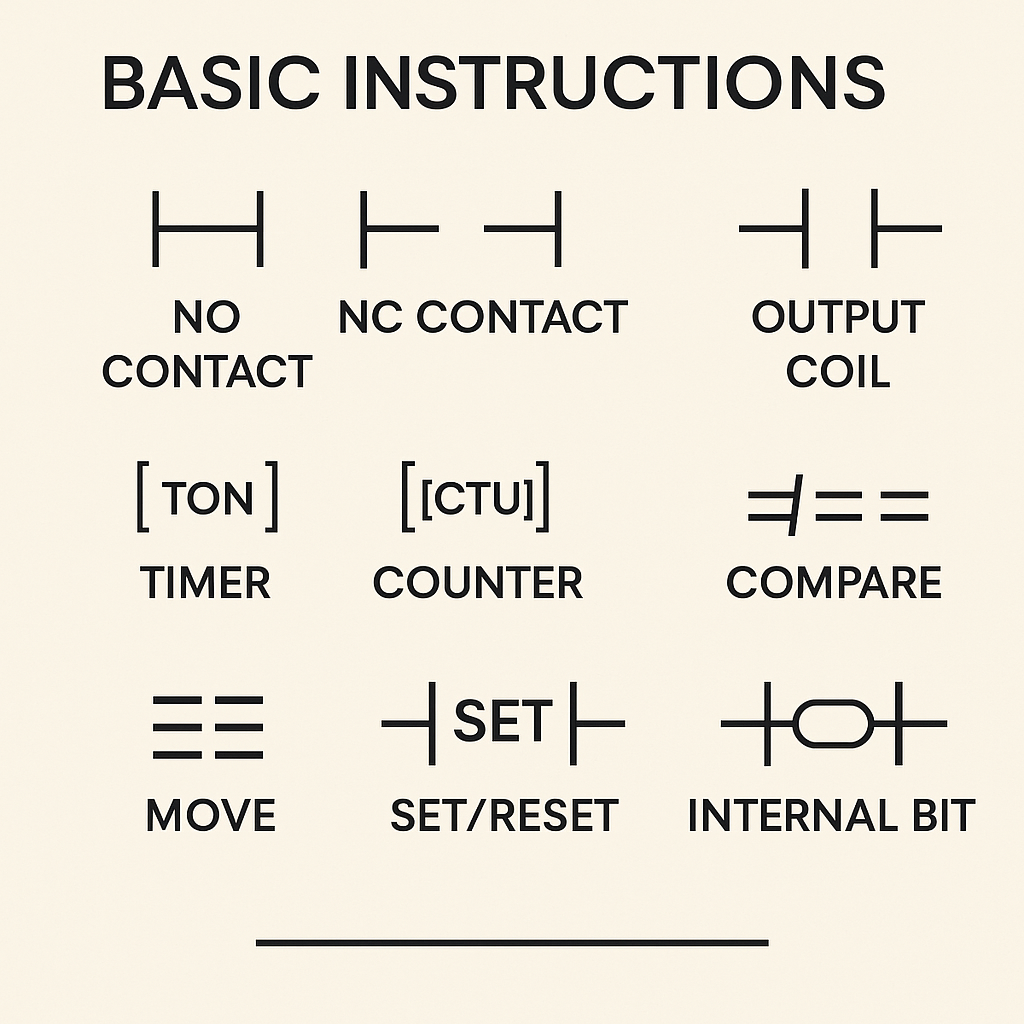
Ladder Logic – Basic Instructions
Ladder Logic (LD) is the most widely used programming language in PLC automation. Its visual, relay-style structure makes it easy for technicians, electricians, and engineers to understand how a control system behaves. Whether you’re new to PLC programming or refreshing your skills, learning the basic Ladder Logic instructions is the key to building reliable and effective automation programs.
This guide explains the foundational instructions used in most PLC platforms, including Siemens, Allen-Bradley, Mitsubishi, and Omron.
1. Normally Open Contact (NO)
The Normally Open (NO) contact—sometimes called an “Examine If Closed (XIC)” instruction—allows power to flow through a ladder rung when the referenced input or internal bit is true.
You use this instruction for conditions that must be active to proceed, such as:
- A start button
- A sensor detecting a product
- A system-enable signal
2. Normally Closed Contact (NC)
The Normally Closed (NC) contact, or “Examine If Open (XIO),” allows power through when the referenced input or bit is false.
Common uses include:
- Stop buttons
- Fault conditions
- Safety doors (where closed door = false = contact energized)
NC contacts are essential for fail-safe design.
3. Output Coil
The Output Coil energizes an output—such as a motor, light, solenoid, or internal memory bit—when power reaches it on the rung.
Types of coils include:
- Standard Coil (OTE/OUT) – turns an output ON when rung logic is TRUE
- Latch Coil (OTL/SET) – turns output ON and keeps it ON
- Unlatch Coil (OTU/RESET) – turns output OFF
Latch/unlatch coils are useful for start/stop control circuits.
4. Timer Instructions
Timers are essential for time-based control.
Common timer types:
- TON (Timer ON Delay) – delays turning ON
- TOF (Timer OFF Delay) – delays turning OFF
- RTO (Retentive Timer) – accumulates time even after rung conditions change
Real-world uses:
- Conveyor delays
- Motor start staggers
- Purge cycles
- Alarm delays
5. Counter Instructions
Counters track how many times an event occurs.
Common counter types:
- CTU – Count Up
- CTD – Count Down
- CTR – Bi-directional Counter (platform-dependent)
Examples:
- Counting products on a conveyor
- Cycle counting for machine maintenance
- Limiting machine operations per shift
6. Compare Instructions
Compare functions help evaluate numerical values.
Typical instructions:
- EQU – equal
- NEQ – not equal
- GRT – greater than
- LES – less than
You can use them for:
- Temperature thresholds
- Speed monitoring
- Stock level detection
- Quality checks
7. Move and Data Handling Instructions
Modern PLCs use data registers, so data manipulation is essential.
Common instructions include:
- MOV – move a value
- ADD/SUB/MUL/DIV – math operations
- COPY – duplicate arrays or blocks
- SWAP – switch high/low words
These instructions support everything from recipe handling to advanced automation.
8. Set/Reset (Latch/Unlatch) Logic
Set and Reset instructions control memory bits or physical outputs that must remain in their state until changed by another condition.
Typical uses:
- Motor run commands
- Alarms
- Mode selection (Auto/Manual)
9. Internal Bits (Markers)
Internal memory bits (M, B, or BOOL tags) act like virtual relays.
Common uses:
- Storing intermediate logic conditions
- Step sequencing
- Machine mode flags
- Start/stop memory
Internal bits help simplify complex Ladder Logic programs.
Why Basic Ladder Instructions Matter
Mastering basic Ladder Logic instructions is essential because:
- They form the foundation of ALL PLC programs
- They allow you to troubleshoot machines faster
- They create programs that are easy to read and modify
- They ensure safe, predictable machine behavior
Understanding these building blocks prepares you for more advanced concepts like PID loops, state machines, structured text integration, and modular programming.